HTML <img> element
The <img> element embeds an image into the document. It is used for meaningful images that are part of the page content, such as photographs, diagrams, icons with meaning, charts, illustrations, screenshots, or visual examples.
The src attribute gives the image file or image resource. The alt attribute gives replacement text for the image. That replacement text matters because the image may fail to load, or the reader may be using a non-visual reading path.
The alt text should do the image's job in words. If the image is a diagram, describe the useful information. If the image is a button icon, describe the action. If the image is decorative and adds no information, use alt="" to mark it as decorative. Omitting alt does not convey the same meaning and can leave readers without a useful replacement. Complex diagrams may also need a fuller explanation in nearby text.
The width and height attributes can give the browser the image's intended dimensions. Use integer dimensions in CSS pixels, without a unit suffix, and preserve the image's aspect ratio. They help the browser reserve space before the file loads; CSS can still resize the displayed image.
The srcset and sizes attributes can provide responsive image choices. With width descriptors such as 480w and 960w, srcset identifies the files' intrinsic widths, while sizes describes the intended display width, for example sizes="(max-width: 600px) 100vw, 480px". With density descriptors such as 1x and 2x, sizes is not used. The browser selects a suitable candidate; these attributes do not set the image's CSS width.
The <img> element is empty. It has no closing tag and no text content. If an image needs a visible caption, place it inside a <figure> with a <figcaption>; do not try to make the image element contain the caption.
Attributes: src, alt, srcset, sizes, crossorigin, usemap, ismap, width, height, referrerpolicy, decoding, loading, fetchpriority, GLOBALS.
Typical layout:
<img
  src="examples/box-model-wide.svg"
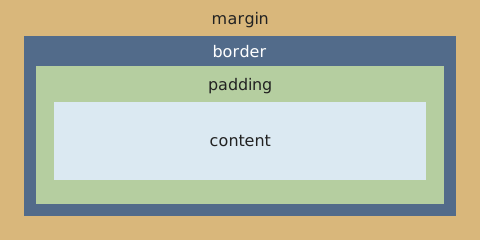
  alt="CSS box model, from outside in: margin, border, padding, content."
  width="480"
  height="240">
Visual representation: