HTML <source> element
The <source> element supplies an alternative media resource. It is used inside <picture>, <audio>, or <video>.
Inside <picture>, <source> offers possible image sources. The browser checks the conditions, such as media queries or supported file types, and then chooses a suitable image for the following <img> element.
Inside <audio> or <video>, <source> offers possible media files. The browser considers the sources in order, skipping unsuitable candidates. Put these sources before fallback text or track elements, and omit src on the parent media element when using child sources for selection.
The exact useful attributes depend on the parent element. In <picture>, srcset is used instead of src. In <audio> and <video>, src gives the media file.
The media attribute can restrict a source to certain viewport or device conditions. The type attribute gives a MIME type such as image/webp or audio/ogg, allowing the browser to skip an unsupported format. Picture selection can respond to viewport changes; audio and video evaluate the media conditions during resource selection rather than continuously switching on resize.
The <source> element is empty. It has no closing tag and no visible content. It is not the image, audio, or video itself; it is one possible source the browser may use.
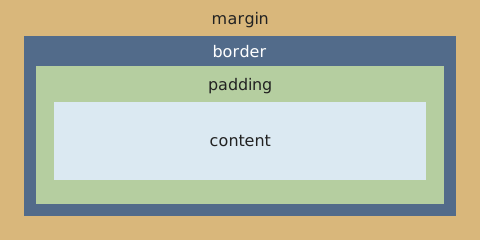
In the picture example below, the wide diagram is selected when the viewport is at least 700 CSS pixels wide. Otherwise, the final <img> supplies the compact diagram. The alternative text belongs on that image, not on the source.
For audio, an illustrative source list is shown below. The filenames stand for audio files you would supply; this is a markup example rather than an active player.
<audio controls>
  <source src="lesson.ogg" type="audio/ogg">
  <source src="lesson.mp3" type="audio/mpeg">
</audio>
Attributes: src for audio/video; srcset, sizes, width, and height for pictures; media, type, and GLOBALS in either context.
Typical layout:
<picture>
  <source media="(min-width: 700px)"
    srcset="examples/box-model-wide.svg"
    width="480" height="240">
  <img src="examples/box-model-compact.svg"
    alt="CSS box model, from outside in: margin, border, padding, content."
    width="240" height="240">
</picture>
Visual representation: